
Canon Pixma G1000 printer Review
Few months back , Canon India has launched its  four new PIXMA G series printers; G1000, G2000, G2002, G3000 of CISS printers. The PIXMA G Series range starts from Rs. 9595/- for the basic model and goes up to Rs. 16795/- for the wireless model.
Today, I will tell my experience with Canon Pixma G1000. It is the basic model of entire PIXMA G series printers.
Inside The Box:
Inside the box, user will get Printer, two cords, Cyan, Magenta, Yellow and Black inks, two Cartridges and CD.

Specifications for PIXMA G1000
General
Interface           Hi-Speed USB
Paper Output Tray A4, Letter = 50, Legal = 10
Prints                                                  A 4 x 6 borderless photo in 60secs
Maximum Printing Resolution     4800 (horizontal)*1 x 1200 (vertical) dpi
Print Head / Ink Type                      Individual Ink Bottle
Number of Nozzles                        Total 1,472 nozzles
Ink Droplet Size                             2pl min
Ink Bottle                                       GI-790 (Cyan, Magenta, Yellow, Black)
Paper Handling
Plain Paper                            A4, A5, B5, Letter = 100, Legal = 10
High Resolution Paper (HR-101N)Â Â Â Â Â Â Â Â A4 = 80
Photo Paper Plus Glossy II (PP-201)Â Â Â Â Â Â 4 x 6 = 20
Photo Paper Pro Luster (LU-101)Â Â Â Â Â Â Â Â Â Â A4 = 10
Photo Paper Plus Semi-Gloss (SG-201)Â Â Â Â Â Â Â Â 4 x 6 = 20
Glossy Photo Paper Everyday Use (GP-601)Â Â Â A4 = 10, 4 x 6 = 20
Glossy Photo Paper Everyday Use (GP-508)Â Â Â A4 = 10, 4 x 6 = 20
Matte Photo Paper (MP-101)Â Â Â Â Â Â Â Â Â Â Â Â Â Â Â A4 = 10, 4 x 6 = 20
Envelope                               European DL/US Com. #10 = 10
Operating Environment
Temperature       5 – 35 Deg C
Humidity          10 – 90% RH (no dew condensation)
Recommended Environment
Temperature               15 – 30 Deg C
Humidity                    10 – 80% RH (no dew condensation)
Power
Power ACÂ Â Â 100 – 240V; 50 / 60Hz
Power Consumption
OFFÂ Â Â Â Â Â Â Â Â Â Â Â Â Â Â Â Â Â Â Â Â Â Â Â Â Â Â Â Â Â Â Â Â Â Â Â Â Â Â Â Â Â Â Â Â Â Â Â Â Â Â Â Â Â Â Â Â Â Â Â Â Â Â Â Â Â Â Â Â Â Â Â Â Â Â Â Â Â Â Â Â Â Â Â Â Â Â Â Â Approx. 0.4W
Standby (scanning lamp is off)(USB connection to PC) Â Â Approx. 0.8W
Copying (USB connection to PC)Â Â Â Â Â Â Â Â Â Â Â Â Â Â Â Â Â Â Â Â Â Â Â Â Â Â Â Â Â Â Â Â Â Â Â Â Â Â Â Â Â Â Â Approx. 13W
Environment
Regulation                            RoHS (EU, China), WEEE (EU)
Eco-Label                                Energy Star
Dimension(W x D x H)Â Â
Approx. 445 x 330 x 135mm
Weight
Weight   Approx. 4.3kgÂ
Warranty
1 Year Manufacturer Warranty
Working
Canon Pixma G1000 printer use Full-photolithography Inkjet Nozzle engineering, or FINE technology for short, to create high-density print heads with microscopic ink droplet sizes. This technology enables the printers to achieve high resolution images with incredible photo-quality. The Canon PIXMA Integrated Hybrid Ink system further optimizes printing which results in vivid and vibrant photographs and sharp text documents. PIXMA G Series printers can also print borderless photographs up to A4 size.
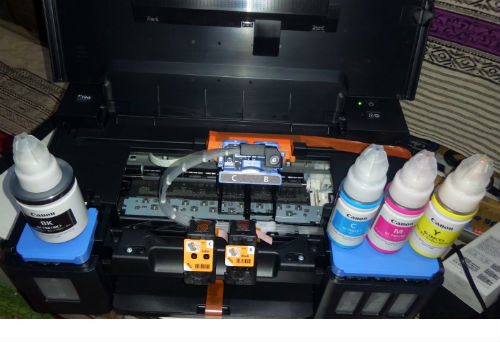
Canon Pixma G1000 printer features new integrated refillable ink tanks with print yield as high as 6000 pages mono prints and 7000 pages color prints. The printers have individual ink tanks for Cyan, Magenta, Yellow and Black. The replacement ink bottles are priced at only Rs. 499/- per unit.

Built-in integrated ink tanks create a compact printer body. Users can also view remaining ink levels easily at a glance.
Canon Pixma G1000 printer supports Windows 10, Windows 8, Windows 7, Windows 7 SP1, Windows Vista SP2, Windows XP SP3 32-bit, and Mac OS (OS X v10.7.5 – OS X v10.10) operating systems. Hard disk space for Windows, it should be 3.5GB and for Mac OS, it should be 2GB. For Mac OS, an internet connection is required during software installation. An internet connection is also required to use Easy-WebPrint EX and all the Online Manual.
Display for both operating system should be XGA Â 1024 x 768.
Verdict
Canon Pixma G1000 printer is good for home use. Users can keep it any corner of their home due to its very compact design. Â Users can also view remaining ink levels easily at a glance.
Technuter.com News Service


